Quit Trading Coins — A Step-by-Step Guide to Issuing Your Own Token
- This tutorial is based on the ERC-20 protocol in the Ethereum ecosystem and requires no programming skills whatsoever
- This tutorial is only for friends with a relatively weak foundation in computers; experts, please move along
- For all links in this article, please right-click and choose “Open in new window”
Issuing your own virtual coin / virtual asset / private currency / ERC-20 token (collectively referred to below as a “token”), as described in this article, requires the following steps:
- Prepare a computer with internet access;
- Prepare the attribute information of the token you want to issue;
- Install and open the Google Chrome browser;
- In Google Chrome, install and configure the MetaMask wallet (referred to below as the “little fox wallet”);
- Obtain ETH tokens on the Ethereum Ropsten test network;
- Use the one-click token issuance tool to issue your own token;
- Add the issued token to your wallet;
- Done;
Detailed steps follow:
1. Prepare a computer with internet access
First, prepare a computer with internet access. The token issuance process is done on a computer; both Windows and Apple computers work.
2. Prepare the attribute information of the token you want to issue
Decide on the attribute information of the token you want to issue first, and write it down on paper so you can fill it in directly later;
The attribute information includes:
- Token name: e.g., Bitcoin, Citcoin, Ditcoin, renminbi. (Please use English characters)
- Token symbol: e.g., BTC, CTC, DTC, RMB. (Usually 3–5 characters)
- Initial supply of the token (in units/coins): e.g., 21000000, 100000.
3. Install and open the Google Chrome browser
You can also use the Firefox browser, but Google Chrome is recommended here. It is relatively stable. Please install it first; all subsequent steps are performed in Google Chrome.
Download address: Click to install
Note: If you are in mainland China and have no way to get around the firewall, please download and install Lantern to get uncensored internet access (free to use). You must have uncensored internet access, because later steps require downloading the little fox wallet from the Google Web Store: link
4. Install and configure the little fox wallet in Google Chrome
Note: If reading English is a struggle, right-click in the browser and choose “Translate to Chinese”
Note: If you have already installed and configured the little fox wallet, please go straight to the next step
In Google Chrome, open this link
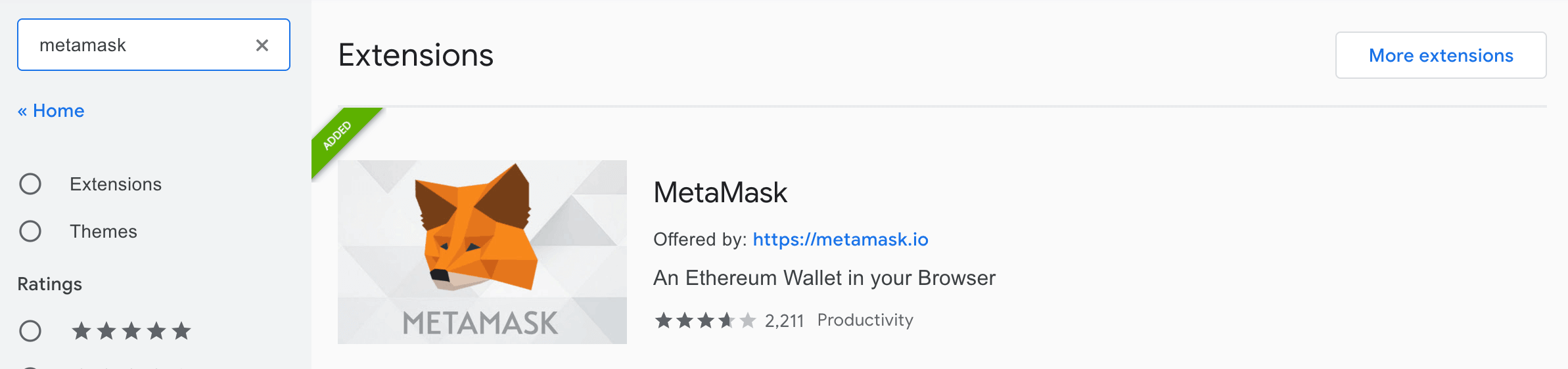
In the search bar on the left, search for metamask. You will see the app shown in the image below; click to install it, then follow the app’s guide to configure it.
Note: Please configure the little fox wallet strictly according to the on-page instructions. Even though we are using a test network for now, please write your mnemonic phrase down on paper only; do not store it in any cloud drive, and do not send it to anyone via messaging tools. Build good private-key management habits.
Once configured, click the little fox icon and switch to the Ropsten test network.
5. Obtain ETH tokens on the Ethereum Ropsten test network
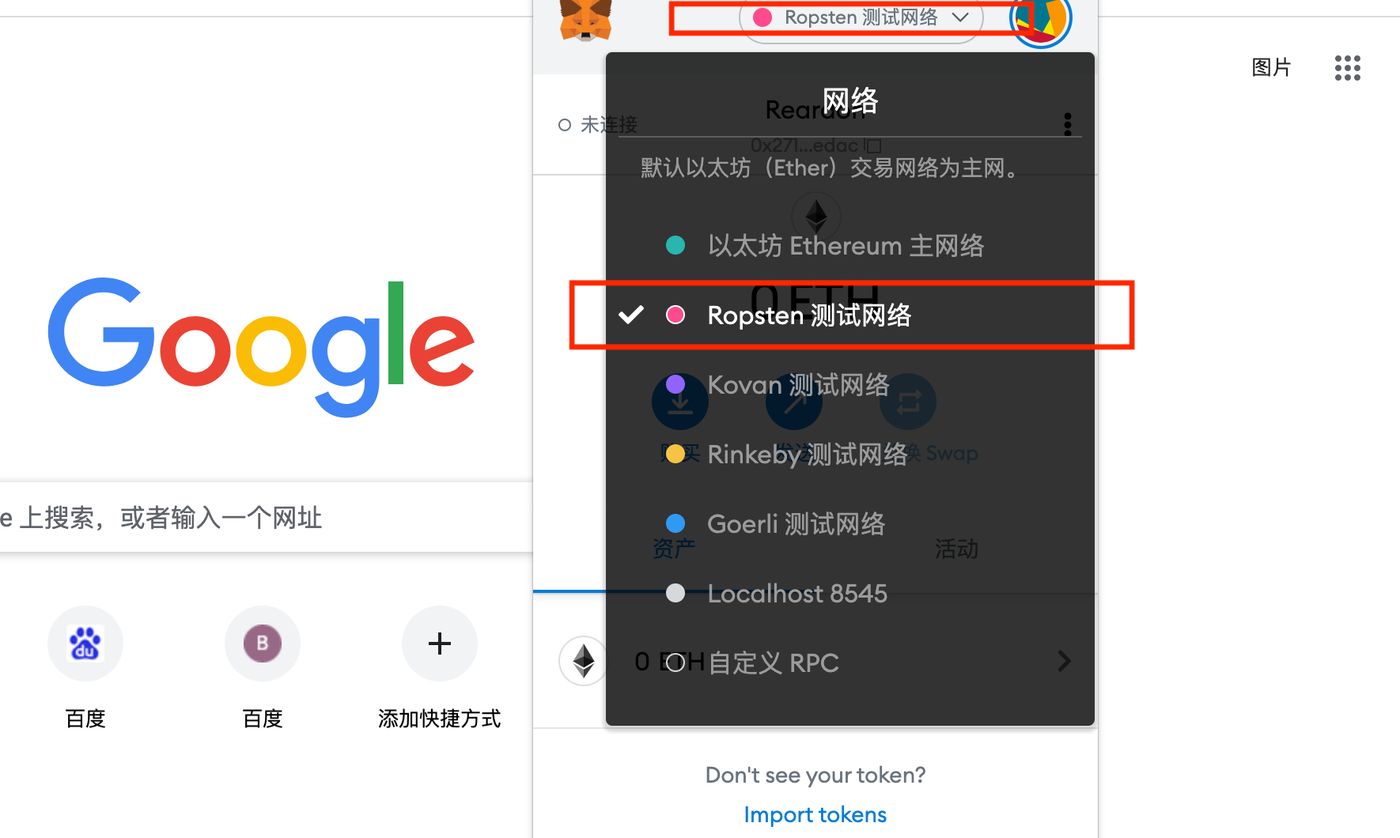
Note: This tutorial issues a token on the Ethereum Ropsten test network as an example. If you issue a token on the main network, you must stay on the “Ethereum Main Network” (referred to below as the mainnet) throughout. Now, as shown in the image below, select the Ethereum Ropsten test network (referred to below as the testnet).
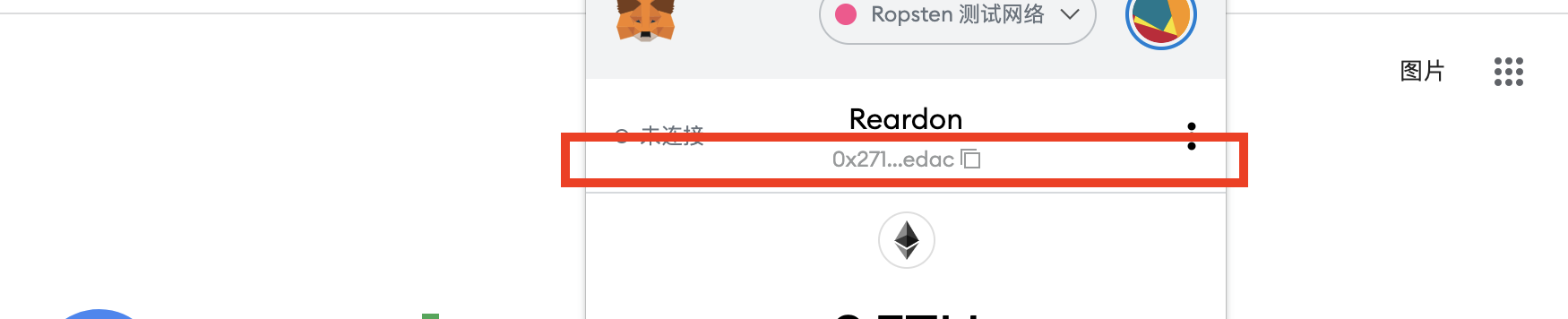
Once selected, as shown in the image below, copy your Ropsten test network wallet address from the spot marked by the red box on the page. It looks like:
0x271eDbE0Fb2809de96C05207E4bbc3A73aD5edac
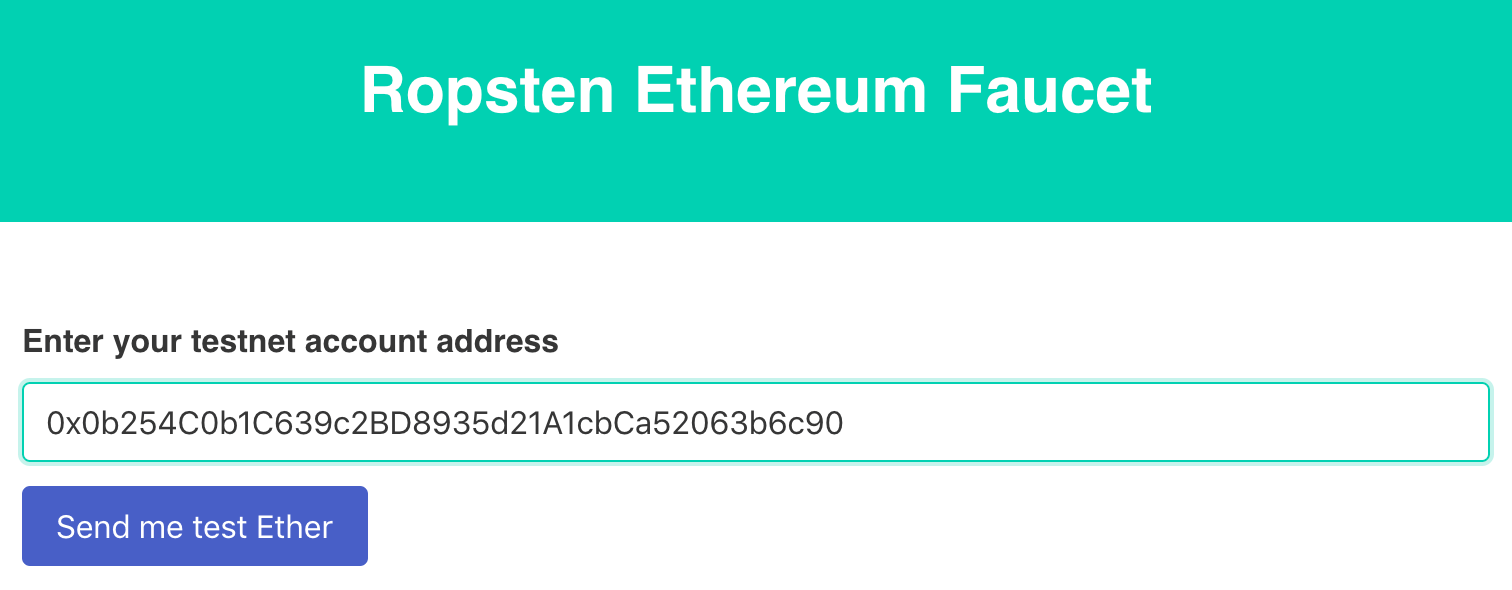
Then open the following link, paste the wallet address you just copied into the address field to get free testnet ETH, as shown in the image below, then click Send me test Ether. Wait a few seconds, then open the little fox again, and you will see that your testnet wallet now holds testnet ETH.
Note: The ETH here is for testing only and cannot be withdrawn to an exchange for trading.
6. Use the one-click token issuance tool to issue your own virtual coin
After completing all the steps above, you can officially start issuing your token.
Open the one-click token issuance tool: link
In the interface on the left shown in the image below, fill in the following in order:
- Token Name: e.g., Bitcoin, Citcoin, renminbi. (Use English characters)
- Token Symbol: e.g., BTC, CTC, RMB. (Usually 3–5 characters)
- Initial Supply: e.g., 21000000, 100000
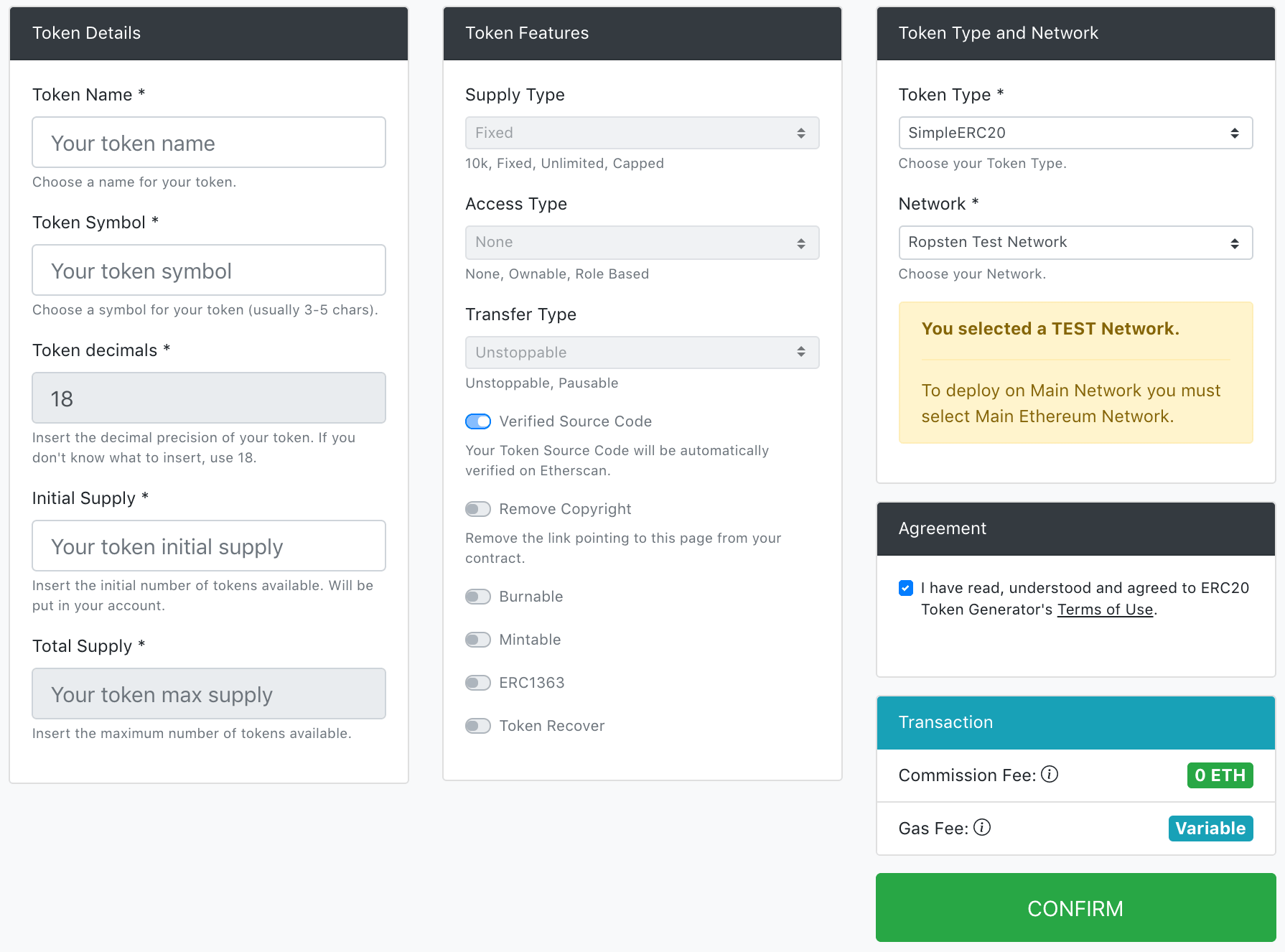
Do not modify the middle column. Then, on the far right of the page, make the following selections:
- Under Token Type, select from the dropdown: SimpleERC20
- Under Network, select from the dropdown: Ropsten
- Check Agreement
- Click in the bottom-right corner: CONFIRM
After clicking CONFIRM, the little fox wallet will pop up automatically; then click Confirm in the little fox wallet popup.
7. Add the issued token to your wallet
When you see the following information, it means the token has been created successfully!
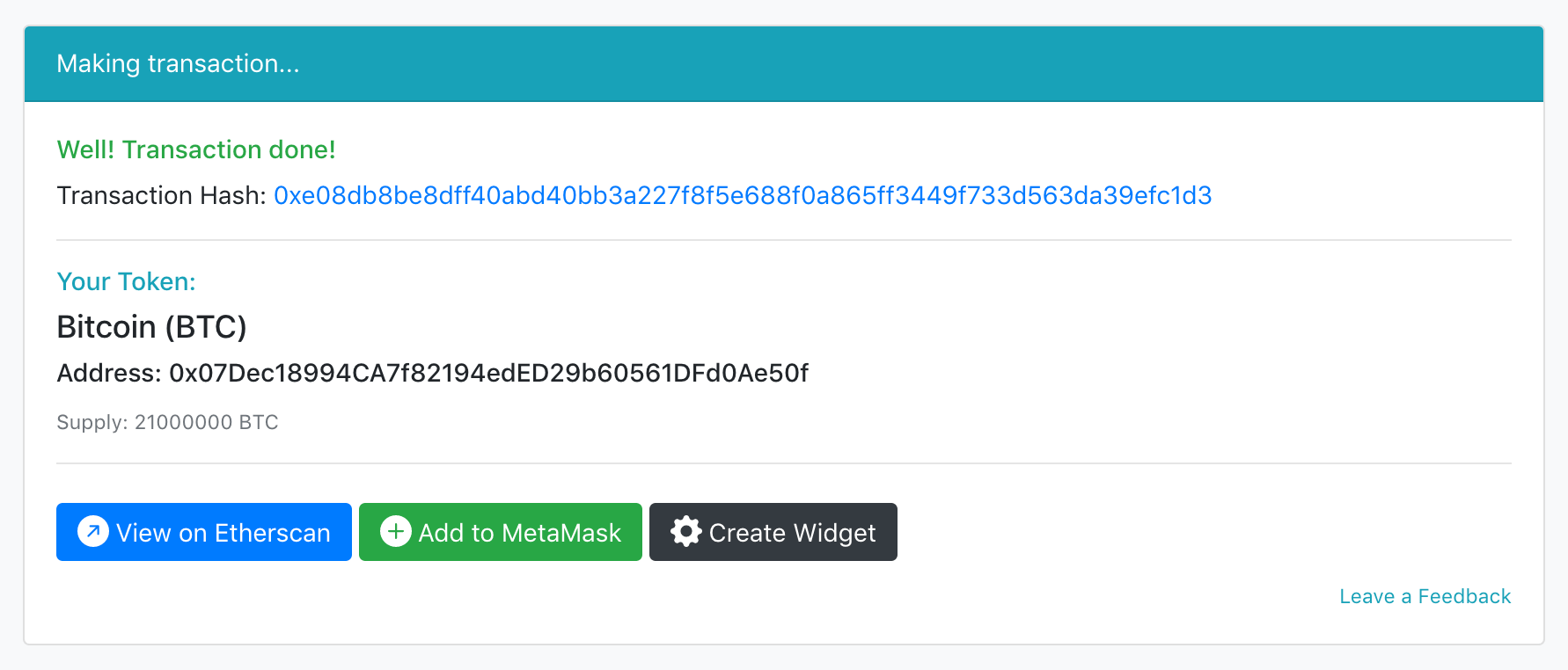
Next, you need to add the created token to your little fox wallet.
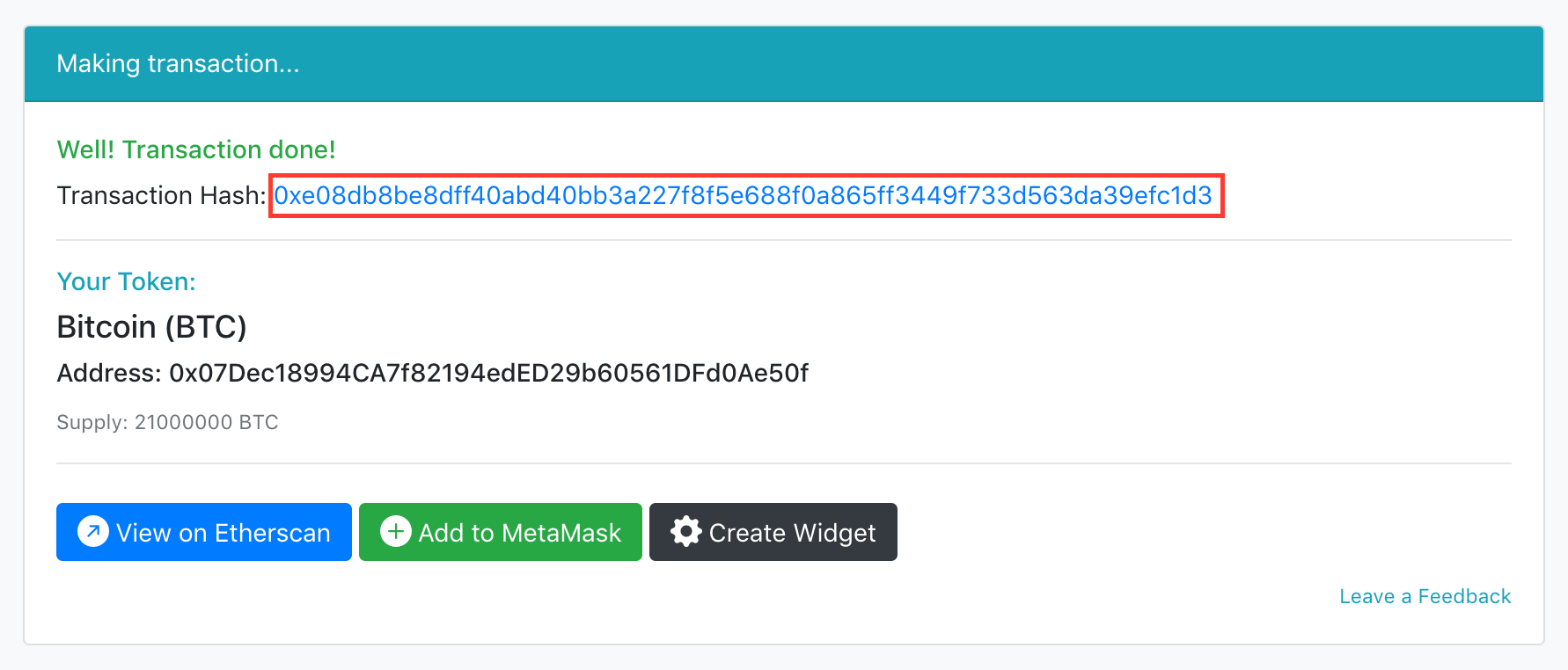
Copy the address shown in the red box in the image below.
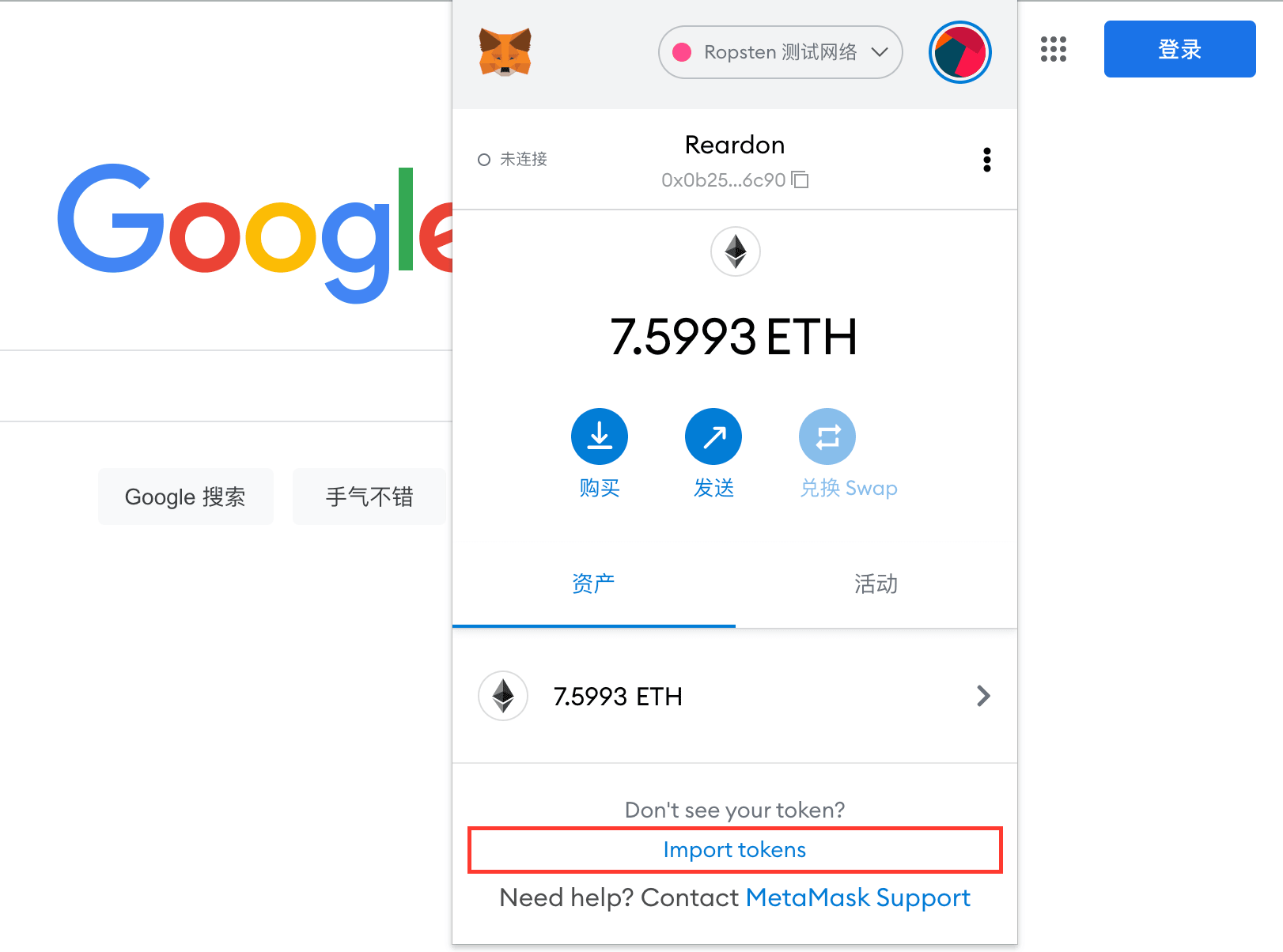
Click to open the little fox wallet, and as shown in the red box in the image below, click Import Tokens.
The following interface will appear. Then paste the address you copied in the previous step into the Token Contract Address field at the spot marked by the red box in the image below.
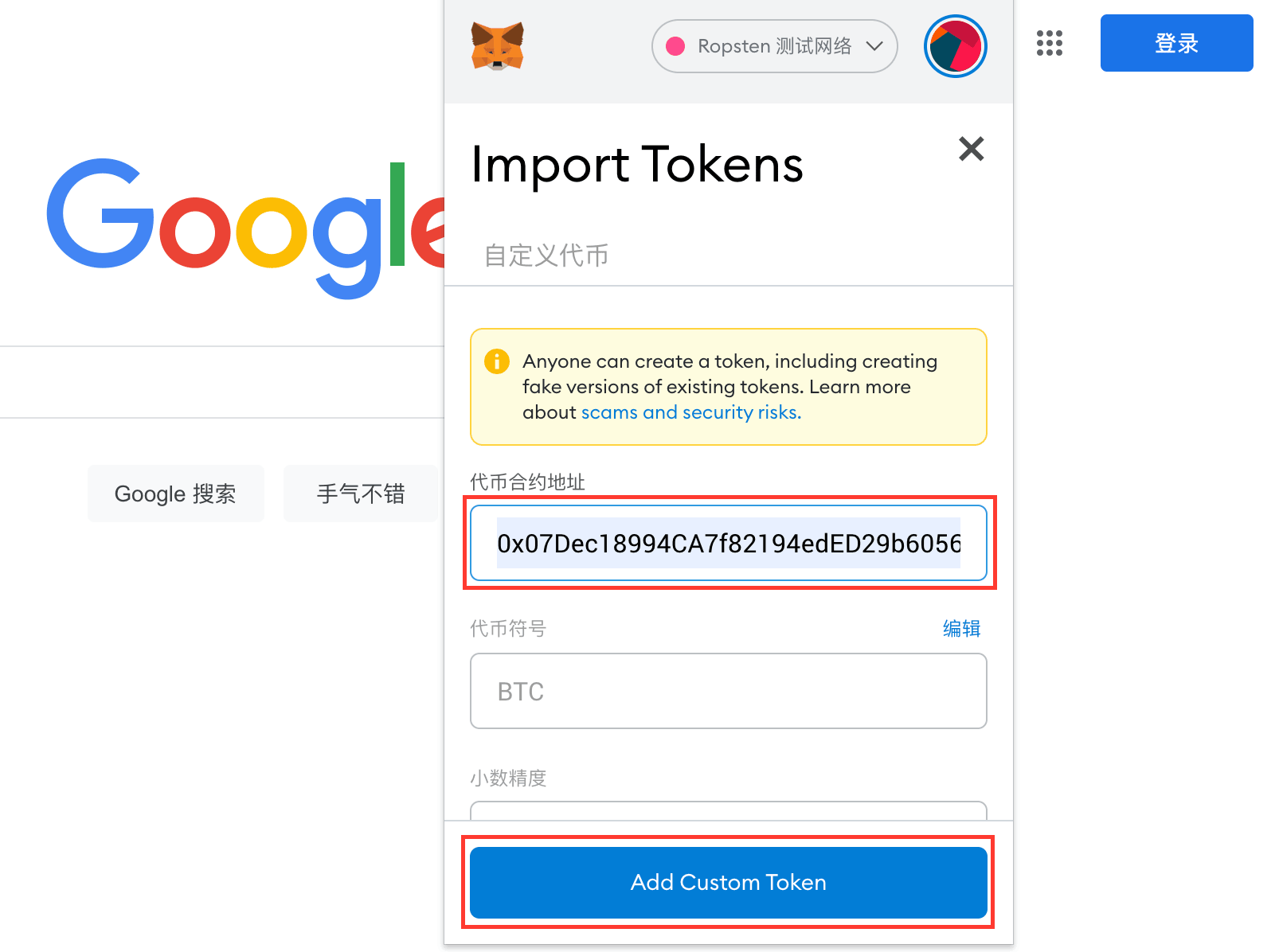
Then click Add Custome Token at the second red box above. The following interface will then appear; click Import Tokens again.
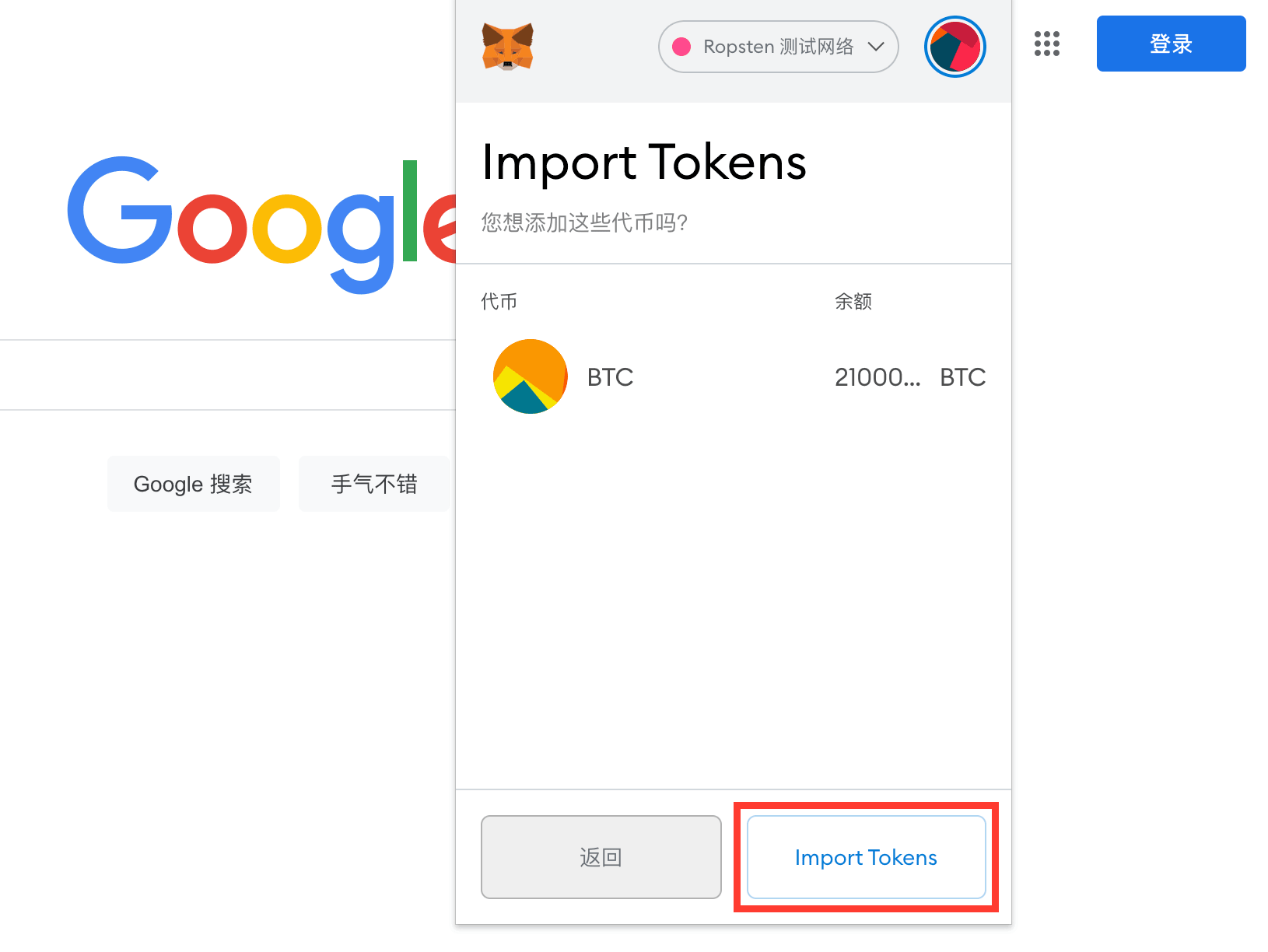
When the following interface appears, it means the token was added successfully!
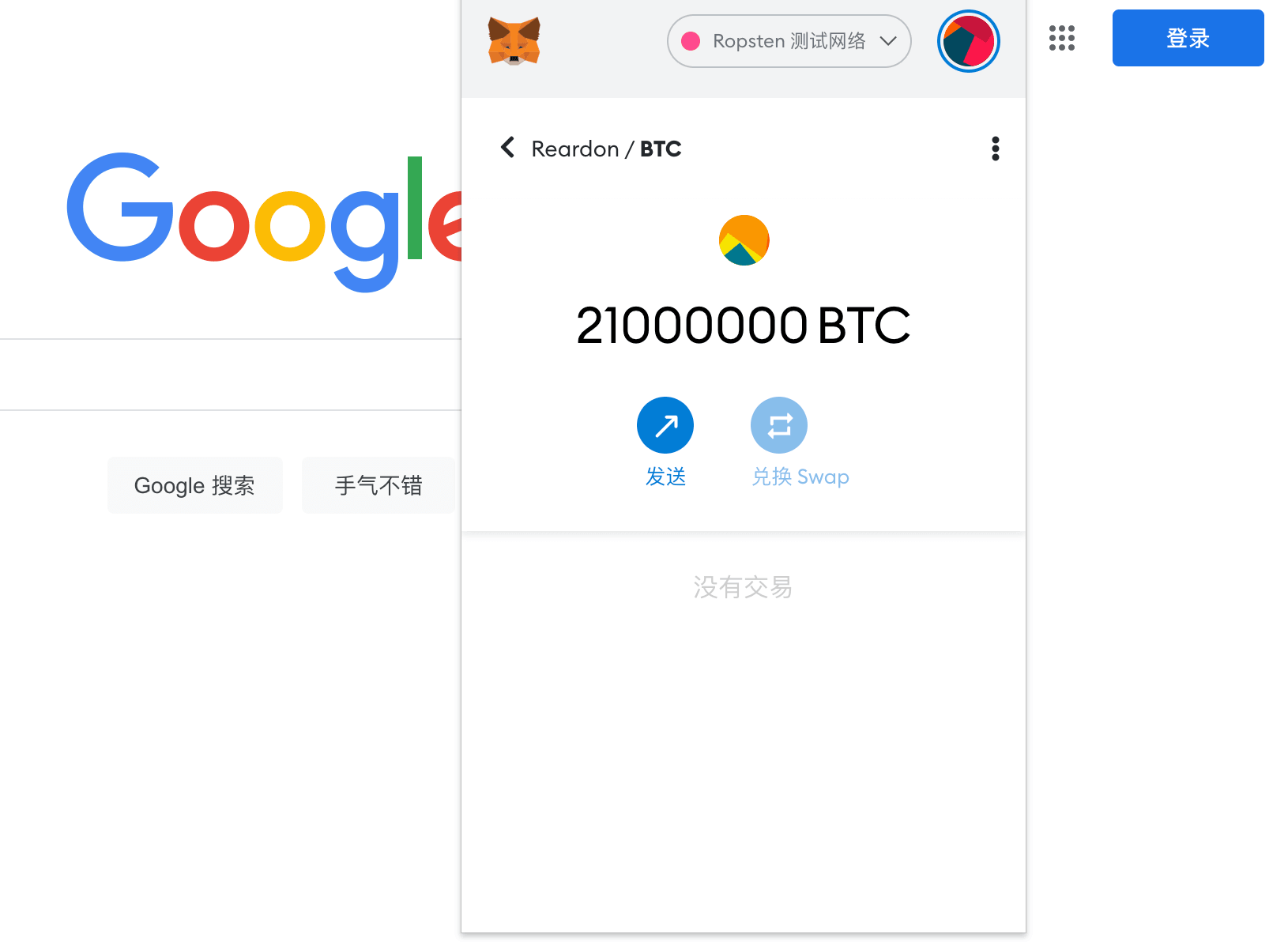
Now the token you created has been added to your little fox wallet!
8. Done
The above are the complete steps for issuing a personal token on the Ethereum Ropsten test network.
Notes:
- The network used above is the Ethereum Ropsten test network;
- If you want to use the one-click token issuance tool above to issue a token on the mainnet, the steps are similar to the above, but it will consume real ETH. The ETH consumed includes the token issuance commission (the commission currently charged by the one-click token issuance tool is 0.035 ETH) and the Gas fee needed to run the contract (at the rates when this article was written, the Gas fee was 0.04 ETH; the two combined total 0.075 ETH);
- The ETH consumed is the actual cost of issuing a mainnet token following the method in this article. You need to deposit a sufficient amount of ETH into the little fox wallet in advance, from a personal wallet or an exchange;
- Issuing a token carries a certain cost, so think it through carefully before issuing for real;
Disclaimer:
- This article is for technical exchange only, to help general users understand the token issuance process and costs. It is not expert advice for formally issuing tokens. If any organization or individual, inspired by this article, loses coins for any reason during the token issuance process, I bear no joint liability whatsoever!
- Virtual currency investment is a high-risk activity; enter the market with caution!